


Most people searching for a Notion life dashboard template are not just looking for something to download—they’re trying to answer a bigger question:
Should I use a free template, or is a paid system actually worth it?
At first glance, free Notion templates seem enough. They promise task tracking, goal planning, and an “all-in-one” dashboard—without paying anything.
But once you start using them, the reality often looks different:
- Pages feel disconnected
- Workflows break over time
- You spend more time fixing the system than using it
That’s where the difference between free vs paid Notion life dashboard templates becomes clear.
This guide breaks down:
- what a life dashboard template actually includes
- how free and paid versions differ in structure and usability
- and most importantly, whether a paid template is actually worth it for your use case
TL;DR: Free vs Paid Notion Life Dashboard Templates
- Free templates are good for simple use cases like task tracking or testing Notion, but they are often disconnected, manual, and limited in scope
- Paid templates are built as complete systems with connected databases, workflows, and automation that reduce setup time
- The real difference isn’t price—it’s structure, scalability, and long-term usability
- Free setups often require ongoing fixes and rebuilding, while paid systems are designed for consistency and growth
- If you only need basic tracking → free is enough
- If you want an all-in-one life dashboard that works long-term → paid is usually worth it
Notion Life Dashboard Template (What It Actually Includes)
Before comparing free vs paid, you need to understand what you’re actually evaluating.
Most people think a “life dashboard” is just a homepage with widgets or beautiful layouts.
It’s not.
A proper Notion life dashboard template is a system—not just a collection of pages.
What a Life Dashboard Template Is (System vs Pages)
A common mistake is treating Notion templates as static pages:
- a task list
- a goal tracker
- a notes page
These are just components, not a system.
A real life dashboard template connects everything together:
- tasks link to goals
- notes support projects
- habits influence daily planning
Instead of jumping between unrelated pages, everything works as a single operating system for your life.
This is the key distinction:
👉 This difference becomes critical when comparing free vs paid templates later.
Core Modules (Tasks, Goals, Notes, Finance, etc.)
Most Notion life dashboard templates are built around a set of core modules.
These modules define how your system functions day-to-day.
1. Task Management
- Daily and weekly planning
- Priority tracking
- Linked to goals or projects
2. Goal Tracking
- Long-term objectives
- Progress tracking
- Alignment with tasks
3. Notes / Knowledge Base
- Centralized information storage
- Linked to projects or areas of life
- Supports decision-making
4. Habit Tracking
- Daily routines
- Behavioral consistency
- Often connected to goals
5. Dashboard View (the “life dashboard” itself)
- A centralized control panel
- Surfaces what matters today
- Pulls data from all modules
👉 The quality of a template is not based on how many modules it has,
but how well these modules are connected.
What “Complete System” Actually Means
A “complete” Notion life dashboard template is not about having more features.
It’s about having cohesion.
Here’s what defines a complete system:
1. Clear Structure
- Defined databases (tasks, goals, notes)
- Logical relationships between them
- No duplication or fragmentation
2. Built-In Workflow
- You know what to do daily, weekly, monthly
- The system guides usage—not just stores data
3. Minimal Friction
- No need to constantly tweak or fix
- Works immediately after setup
4. Scalability
- Handles more tasks, goals, and data over time
- Doesn’t collapse as complexity increases
Are Paid Notion Life Dashboard Templates Actually Worth It?
The short answer: it depends on whether you value time, structure, and consistency—or prefer to build everything yourself.
Most people don’t fail because Notion is bad.
They fail because their system never fully works.
This is where the difference between free and paid templates becomes practical—not theoretical.
The Short Answer (Who Should Pay vs Stay Free)
If you want a clear decision quickly, use this:
👉 Stay with a free Notion life dashboard template if:
- You only need basic tracking (tasks, notes, simple goals)
- You’re still learning how Notion works
- You don’t mind building and adjusting things yourself
- Your system is low complexity (no need for deep integration)
👉 Free works best for:
- casual users
- early-stage experimentation
- lightweight personal organization
👉 Pay for a Notion life dashboard template if:
- You want a complete, ready-to-use system
- You don’t want to spend hours building and troubleshooting
- You need everything connected (tasks ↔ goals ↔ notes)
- You’ve tried free templates and they didn’t stick long-term
👉 Paid makes sense for:
- people serious about productivity systems
- users managing multiple areas of life
- anyone who values time over DIY customization
One-line decision rule:
If you’re here to learn Notion as a beginner → go free
If you’re optimizing for actual progress, execution & productivity→ go paid
The Real Trade-Off (Time vs Money vs Complexity)
Most comparisons focus on price.
But the real trade-off is this:
Free templates cost less money, but more time and mental effort.
Paid templates cost money, but reduce friction and decision fatigue.
1. Time Cost (The Hidden Factor)
With free templates:
- you spend time combining pages
- fixing broken workflows
- figuring out how everything should connect
What looks “free” often becomes:
- hours of setup
- ongoing maintenance
With paid templates:
- system is already structured
- workflows are pre-built
- you can start using it immediately
👉 You’re not just paying for the template—you’re paying for time saved.
2. Complexity Management
As your system grows:
- more tasks
- more goals
- more areas of life
Free setups tend to:
- become messy
- lose clarity
- require constant restructuring
Paid systems are usually designed to:
- handle complexity from the start
- scale without breaking
- maintain clarity over time
3. Decision Fatigue
Free templates force you to decide:
- how to structure your system
- what to track
- how to connect everything
This leads to:
- overthinking
- constant tweaking
- never “settling” into a system
Paid templates remove that layer:
- structure is already defined
- workflows are intentional
- you focus on using, not designing
4. Long-Term Consistency
This is the most important difference.
Most people don’t need a better tool.
They need a system they will actually stick to.
- Free templates → high dropout rate over time
- Paid templates → higher consistency due to clarity + ease of use
Bottom Line
A paid Notion life dashboard template is worth it if:
- you want a system that works immediately
- you value clarity over customization
- you are tired of rebuilding your setup
It’s not worth it if:
- you enjoy building systems from scratch
- your needs are simple
- you’re still exploring how Notion fits your workflow
Free Notion Life Dashboard Templates (What You Actually Get)
Free Notion life dashboard templates are often the starting point for most users.
They’re accessible, easy to duplicate, and widely shared across marketplaces, blogs, and communities.
At a glance, many of them look complete:
- aesthetic dashboards
- multiple pages
- pre-filled examples
But what you actually get is usually very different from what you expect.
Typical Structure of Free Templates
Most free templates follow a similar structure:
1. Dashboard Page (Visual Layer)
- A clean homepage with widgets or sections
- Quick links to other pages
- Focused on layout rather than functionality
2. Separate Pages for Each Module
- Task tracker
- Goal page
- Notes database
- Habit tracker
These are usually:
- standalone
- not deeply connected
- built for simplicity, not integration
3. Minimal Database Relationships
Some free templates include databases, but:
- relationships between them are limited or missing
- no clear workflow linking tasks → goals → outcomes
This means:
- you’re responsible for connecting everything manually
4. Light or No Workflow Guidance
Most free templates don’t tell you:
- what to do daily
- how to review weekly
- how to use the system long-term
They give you:
- structure (sometimes)
- but not process
👉 In short:
Free templates give you a starting point—not a complete system
Where Free Templates Work Well
Free Notion templates are not “bad.”
They’re just optimized for a different use case.
They work well when your needs are simple and low-stakes.
1. Basic Tracking
If you only need:
- a task list
- simple goal tracking
- note-taking
A free template is often enough.
No need for complex systems.
2. Learning Notion
Free templates are ideal when you’re:
- exploring how Notion works
- testing different layouts
- understanding databases and views
They act as:
- learning tools
- experimentation environments
3. Lightweight Personal Use
If your system:
- doesn’t involve many moving parts
- doesn’t require deep integration
- doesn’t need long-term scalability
Then free templates can stay usable for a long time.
👉 Summary:
Free works best when complexity is low and expectations are minimal
Common Limitations (Fragmentation, Manual Setup)
This is where the gap between expectation and reality shows up.
Most issues with free Notion life dashboard templates come from how they’re structured—not how they look.
1. Fragmentation (Everything Feels Disconnected)
- Tasks are not linked to goals
- Notes are not connected to projects
- Dashboard doesn’t reflect real priorities
Result:
- you jump between pages
- nothing feels unified
2. Manual Setup and Ongoing Fixes
Even after duplicating a template, you still need to:
- customize properties
- fix missing relationships
- adjust views and filters
Over time, you also:
- tweak the system repeatedly
- rebuild parts that don’t work
👉 “Free” becomes:
- ongoing setup cost
- repeated effort
3. No Defined Workflow
Without a built-in system:
- you decide what to do every day
- there’s no clear review process
- consistency becomes difficult
This leads to:
- inconsistency
- abandoned dashboards
4. Poor Scalability
As your life gets more complex:
- more tasks
- more goals
- more areas to manage
Free templates often:
- become cluttered
- lose clarity
- require restructuring
Reality Check
Most free templates are designed for:
- quick adoption
- visual appeal
- broad usability
Not for:
- long-term system thinking
- deep integration
- sustained usage
Bottom Line
Free Notion life dashboard templates are:
- great for getting started
- useful for simple needs
- helpful for learning
But they often fall short when you need:
- structure
- scalability
- consistency
Paid Notion Life Dashboard Templates (What’s Different)
Paid Notion life dashboard templates are more than just a collection of pages—they’re designed as complete systems. They aim to save you time, reduce manual setup, and provide long-term structure.
While free templates can get you started, paid templates solve the common pitfalls of fragmentation, manual setup, and unclear workflows.
Integrated System vs Isolated Pages
The biggest difference? connection.
Paid templates treat the dashboard as a system, not separate pages:
- Tasks, goals, habits, and notes are interlinked
- Dashboards automatically pull priority items from multiple modules
- Updates in one module reflect across the system
Result:
- You see progress at a glance
- No more jumping between isolated pages
- Clear hierarchy and life-wide visibility
This integration saves hours of setup and prevents confusion, which is a frequent issue with free templates.
Built-in Workflows and Automation Logic
Paid templates often come with pre-defined workflows:
- Daily task review flows
- Weekly goal check-ins
- Progress tracking formulas and automations
- Habit completion logic with visual progress bars
These workflows allow you to focus on execution, not setup.
Examples of automation benefits:
- Completing a task auto-updates goal progress
- Habit tracking triggers visual indicators
- Task deadlines sync across modules
This turns the dashboard into a living system, rather than a static page collection.
Designed for Long-Term Use (Not Just Setup)
Paid templates anticipate growth and complexity:
- Scalable module architecture
- Flexibility to add new areas (finance, learning, projects)
- Templates that guide you to review, plan, and reflect regularly
This reduces “dashboard abandonment,” a common issue with free versions.
In short, paid templates are not just about aesthetics—they save time, maintain consistency, and adapt as your life evolves.
Bottom Line
Paid templates are worth it if you want a ready-to-use, integrated system that scales with your needs, reduces manual work, and ensures your life dashboard actually supports your goals rather than creating extra busywork.
This sets up the next natural section: Comparing Free vs Paid: Which Should You Choose?, keeping your blog’s SEO and CTR flow intact.
Free vs Paid Notion Life Dashboard Templates: What You Actually Get
Choosing between free and paid Notion life dashboard templates comes down to how the system is structured, how much time it costs to set up, and how well it works long-term.
While free templates are often quick to start with, paid templates are designed as complete, connected systems that reduce manual setup and scale with your needs.
The comparison below breaks down the key differences across structure, features, automation, and usability, so you can clearly see which option fits your workflow and level of complexity.
Structure (Disconnected vs Unified)
Key Insight: Free templates are visually appealing but often fragmented. Paid templates provide clarity and cohesion, making the dashboard functional, not just decorative.
Time Cost (Setup vs Ready-to-Use)
Free Templates:
- Duplication takes minutes, but setup is ongoing
- You spend hours linking pages, adjusting databases, and fixing formulas
- Hidden cost: recurring tweaks and troubleshooting
Paid Templates:
- Pre-built relationships and workflows reduce setup time dramatically
- Ready-to-use dashboards save days of manual configuration
- Formulas, rollups, and automation work out-of-the-box
Insight: Paid templates buy you time, especially if you’re managing multiple life areas. Free templates cost less money but often more hours.
Flexibility vs Clarity
- Free templates offer flexibility—you can change anything—but too much freedom often creates confusion.
- Paid templates are designed with modular flexibility, but with guided clarity, showing you where and how to expand without breaking the system.
Example:
- Free: add a new habit tracker, but must manually link it to goals and tasks
- Paid: add a habit and it automatically updates progress dashboards and formulas
Insight: Paid systems strike a balance between customization and usability, reducing cognitive load.
Maintenance and Scalability
Free Templates:
- Often fail when your life gets more complex
- Manual updates and tweaks accumulate
- Fragmentation grows with time
Paid Templates:
- Built to scale with life complexity
- Easy to expand modules (finance, learning, projects)
- Maintenance is minimal due to pre-configured formulas and workflows
Insight: Paid dashboards grow with you, while free templates often plateau or break under increased complexity.
Bottom Line
Free templates are fine for experimentation or simple needs.
Paid templates save time, reduce manual work, and provide a systematic life management solution.
This section naturally sets up the final decision guidance: who should stick with free and who should invest in a paid template—perfect for both SEO and CTR.
Why Free Notion Templates Often Cost More Than You Think
Many people assume that free templates are “free” in every sense—but when it comes to building a life dashboard, hidden costs often appear. Let’s break down why free solutions can end up costing more time, effort, and mental bandwidth.
Time Investment and Rework
Free templates are usually fragmented or minimally structured, meaning you spend hours or even days connecting pages, setting up databases, and creating formulas to make the template actually usable.
- Manual setup: Unlike paid templates, free dashboards rarely include pre-built workflows, relations, or rollups.
- Trial-and-error: You’ll often need to tweak formulas, reorganize pages, or merge multiple templates to cover all your needs.
- Ongoing adjustments: As your life changes, you’ll likely spend additional time updating the template manually.
In short, “free” can cost you dozens of hours compared to a paid template with ready-to-use logic.
System Fragmentation Over Time
A free dashboard often starts small—focusing on 1–2 modules like tasks or habits. As you try to expand it:
- Data gets scattered across multiple pages or duplicated databases.
- Search and retrieval becomes harder because items aren’t consistently linked.
- Workflows break when you manually add connections that weren’t designed from the start.
This fragmentation makes long-term usage stressful, not efficient.
Abandonment Risk (Why Most Systems Fail)
Because of the high time cost and ongoing maintenance, many free dashboards end up abandoned within weeks or months. Common patterns include:
- Users start strong but give up when the system becomes too fragmented.
- Partial dashboards cause frustration, because tracking and planning feel disjointed.
- Switching between multiple free templates creates cognitive overload, defeating the purpose of a “life dashboard.”
Investing in a well-designed paid template reduces the risk of abandonment, providing a unified system built for long-term use.
Instead of building and fixing your system over time, you can start with a complete setup that already works.
→ Explore the Notion Life Dashboard Template
When a Free Notion Life Dashboard Template Is Enough
Not every user needs a full-blown, paid Notion system. Free templates can serve well under certain circumstances. Here’s when they make sense.
Simple Use Cases (Tracking Only)
If your needs are basic and focused, free templates can work efficiently. Examples include:
- Tracking daily habits or a to-do list
- Logging workouts, reading lists, or simple goals
- Managing small personal projects without interdependencies
Free templates are lightweight and quick to start, making them ideal for users who don’t require complex workflows or multi-module integration.
Early Stage / Testing Notion
Free templates are perfect if you’re still learning how Notion works or experimenting with dashboards.
- Allows hands-on trial without financial commitment
- Helps you understand Notion’s database, relation, and formula features
- Lets you test your workflow style before committing to a paid system
This approach minimizes risk and helps you identify which modules you actually need.
Low System Dependency
Some users don’t need a central, all-in-one hub. For them:
- Manual setup or multiple small templates is sufficient
- Switching between pages or apps doesn’t create friction
- Long-term growth or scaling is not a priority
Free templates excel when your workflow doesn’t rely on integrated systems, and you’re comfortable filling gaps manually.
When a Paid Notion Life Dashboard Template Is Worth It
Paid templates shine when you need a complete, scalable, and efficient system. Here’s who benefits the most.
You Want an “All-in-One” System
Paid dashboards include tasks, goals, projects, notes, finance, and more in a single, connected system.
- All modules work together seamlessly
- Pre-built relations, rollups, and workflows save setup time
- Consistent structure ensures reliable tracking and retrieval
This makes them ideal for users who want a full life management system without piecing it together themselves.
You Value Time Over Custom Building
If you’d rather invest money instead of countless hours, paid templates are cost-effective in the long run.
- Ready-to-use modules eliminate trial-and-error
- Step-by-step guides and tutorials reduce learning curves
- Workflows are pre-designed to handle common life scenarios
Essentially, time becomes the currency, and a paid template gives you an immediate, polished system.
You Need Consistency and Structure
For anyone relying on a dashboard daily or across multiple life areas, structure matters.
- Paid templates reduce errors caused by fragmented data
- Standardized properties and dashboards maintain clarity
- Scalable design ensures long-term usability without rework
If you want a life dashboard that grows with you instead of creating constant rework, a paid system is worth the investment.
A Complete Notion Life Dashboard System (Example)
Seeing a real-world system helps you understand the value of a connected Notion dashboard.
How the Modules Work Together
A complete dashboard integrates multiple modules, so your data flows naturally:
- Tasks & Projects: link to goals and timelines
- Goals & Habits: roll up into progress dashboards
- Notes & Journals: connected to relevant projects or tasks
- Finance & Budgets: linked with spending habits and goals
The result is a central hub where all life areas communicate, reducing duplication and fragmentation.
Example Workflow (Daily → Weekly → Long-Term)
A well-designed system supports different time horizons:
- Daily: track tasks, habits, and priorities
- Weekly: review progress, update projects, adjust goals
- Long-Term: monitor life goals, finances, and personal growth trends
This structure ensures you’re not just capturing information, but turning it into actionable insights that guide daily decisions.
Get the Notion Life Dashboard Template
If you’ve made it this far, you already understand the difference:
Free templates can help you start.
But a complete system helps you stay consistent and actually follow through.
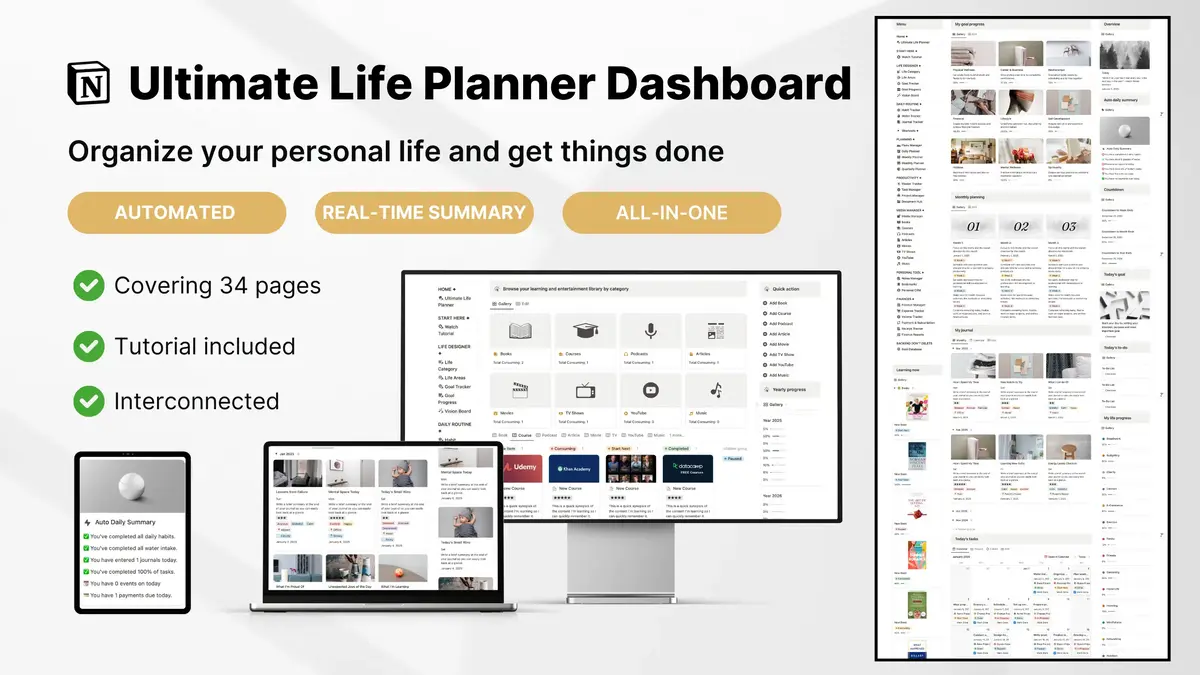
This Notion Life Dashboard Template is designed to remove the friction most people struggle with—so you don’t spend time building, fixing, or switching systems.
What You Get
Instead of isolated pages, you get a fully connected system:
- Tasks, goals, habits, and projects all linked together
- A central dashboard that shows what actually matters today
- Built-in workflows for daily, weekly, and long-term planning
- Pre-configured databases, relations, and views
Everything is structured so you can start using it immediately—not spend hours setting it up.
Why This Works Better Than Free Templates
Most free templates break down over time because they’re not designed as systems.
This template solves that by focusing on:
- Clarity: You always know what to do next
- Consistency: Built-in workflows reduce decision fatigue
- Scalability: Handles more tasks, goals, and life areas without breaking
- Time savings: No need to build or troubleshoot
Instead of constantly adjusting your setup, you can focus on execution and progress.
Who This Is For
This template is a strong fit if:
- You want an all-in-one life dashboard (not scattered pages)
- You’ve tried free templates but couldn’t stick with them
- You value time, structure, and ease of use
- You want a system that grows with your life
If you’re still experimenting or only need simple tracking, free templates may be enough.
But if you’re looking for a system that actually supports your day-to-day decisions, this is where a complete dashboard makes the difference.
Start Using the Complete System
You don’t need to build everything from scratch.
Get the Notion Life Dashboard Template and start with a system that’s already designed to work—so you can focus on what matters instead of managing your setup.
Frequently Asked Questions
Are Notion templates worth paying for?
Paid Notion templates are worth it if you want a ready-to-use, all-in-one system that saves time, reduces errors, and scales with your life. Unlike free templates, paid options include connected modules, built-in workflows, and long-term usability, making them ideal for users who value efficiency, consistency, and structure over DIY setup.
Can I build a life dashboard in Notion for free?
Yes, you can build a life dashboard using free templates or by creating your own pages. Free dashboards are suitable for simple tracking, testing Notion, or lightweight planning, but they often require manual linking, ongoing maintenance, and repeated setup. Advanced features like relations, rollups, and automation are usually missing, which can make free systems harder to scale over time.
What is the difference between a dashboard and a template?
A Notion template is a pre-built page or system for managing specific areas such as tasks, goals, or finances. A dashboard is a centralized hub that integrates multiple templates and modules into a single, connected system. While templates provide structure for individual areas, dashboards offer a bird’s-eye view of your life, projects, and priorities, making your information actionable and easier to manage.
What is an all-in-one Notion template?
An all-in-one Notion template combines multiple life areas into a single, unified system, typically including tasks, projects, goals, habits, notes, and finance. Unlike isolated templates, all-in-one systems allow data to flow seamlessly across modules, helping you track daily tasks, weekly plans, and long-term objectives from one organized workspace.
Who should use a free template vs a paid template?
Free templates are ideal for beginners, early-stage users, or simple use cases that don’t require complex workflows. Paid templates are better for users who want an integrated, scalable, and time-saving system, particularly when managing multiple life areas or long-term projects.
How do I choose the right Notion life dashboard template?
To choose the right template, consider your time, system complexity, and use case. If you prefer custom-building and experimenting, free templates work well. If you value efficiency, consistency, and pre-designed workflows, a paid, all-in-one dashboard is the better option. Look for templates that offer clear structure, connected modules, and tutorials to ensure long-term usability.