

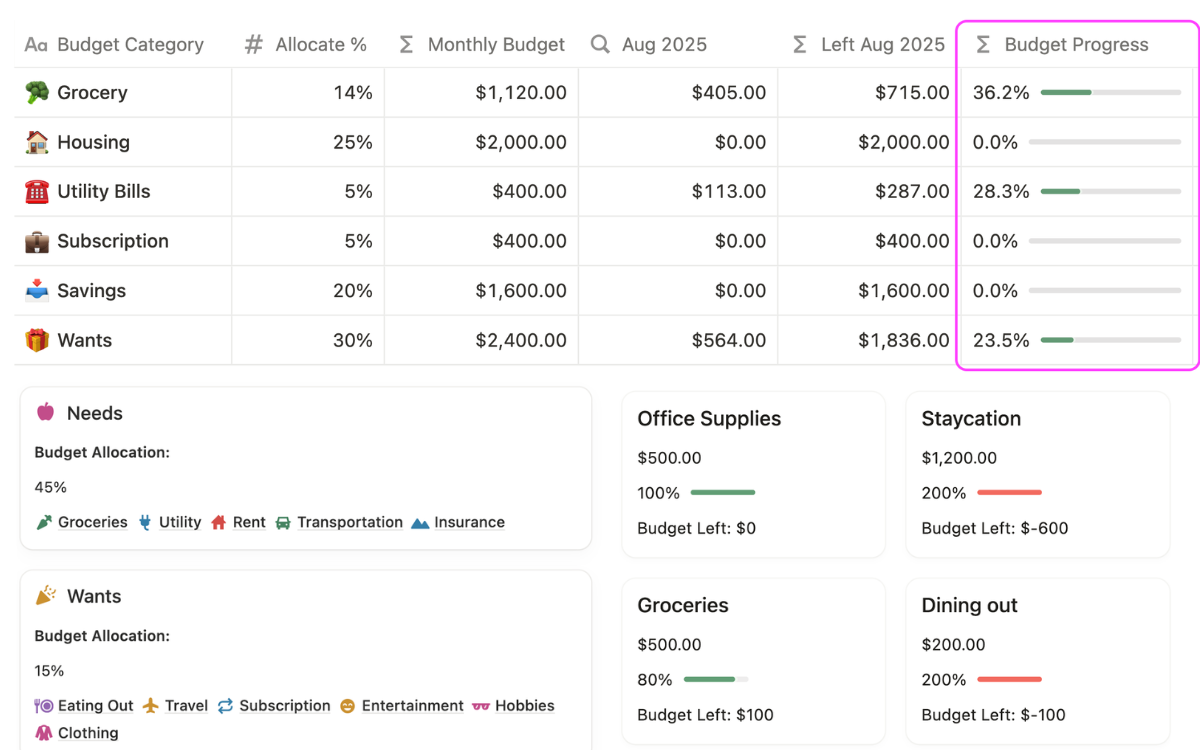
What Is the Notion 50/30/20 Budget Template?
The Notion 50/30/20 Budget Template is a structured budgeting system that helps you plan and control your monthly income using the 50/30/20 rule inside Notion.
Instead of manually calculating budgets or using spreadsheets, you enter your income once. The system automatically splits it into:
- 50% for Needs
- 30% for Wants
- 20% for Savings or Debt
The best part is, you can adjust these percentage number to fit your financial needs. These percentages are then converted into exact budget limits so you know how much you can safely spend in each category.
Unlike simple expense trackers, this is a pre-planning budgeting system, meaning your spending limits are set before you start spending. You can also log expenses and compare them against your budget to see whether you are staying on track or overspending.
This template is part of the Ultimate Notion Finance Tracker, designed to help you manage your money in one connected system.
Notion 50/30/20 Budget Template Video Walkthrough
Watch the video walkthrough to see how the Notion 50/30/20 Budget Template works inside Notion.
This overview shows how income is entered, how the 50/30/20 rule is applied, and how the budget is organized into structured categories and spending limits.
If you want to understand the flow before using the system, this video gives a clear visual breakdown of how your monthly budget is structured inside Notion.
How the Auto Income Split Works in Notion
The core of this Notion 50/30/20 Budget Template is the automatic income allocation system.
You enter your monthly income once, and the template splits it into three fixed categories:
- Needs (50%)
- Wants (30%)
- Savings or Debt (20%)
These percentages are instantly converted into real dollar amounts. You can adjust the percentage split based on your personal budget preference while keeping the same structured framework.
This creates a clear budgeting structure so you always know:
- how much you can spend in each category
- how your income is allocated
- what your spending limits are before you start spending
This removes guesswork and replaces it with a structured budget plan inside Notion.
Key Features of the Notion 50/30/20 Budget Template
This template combines income planning, category budgeting, and expense tracking into one structured system.
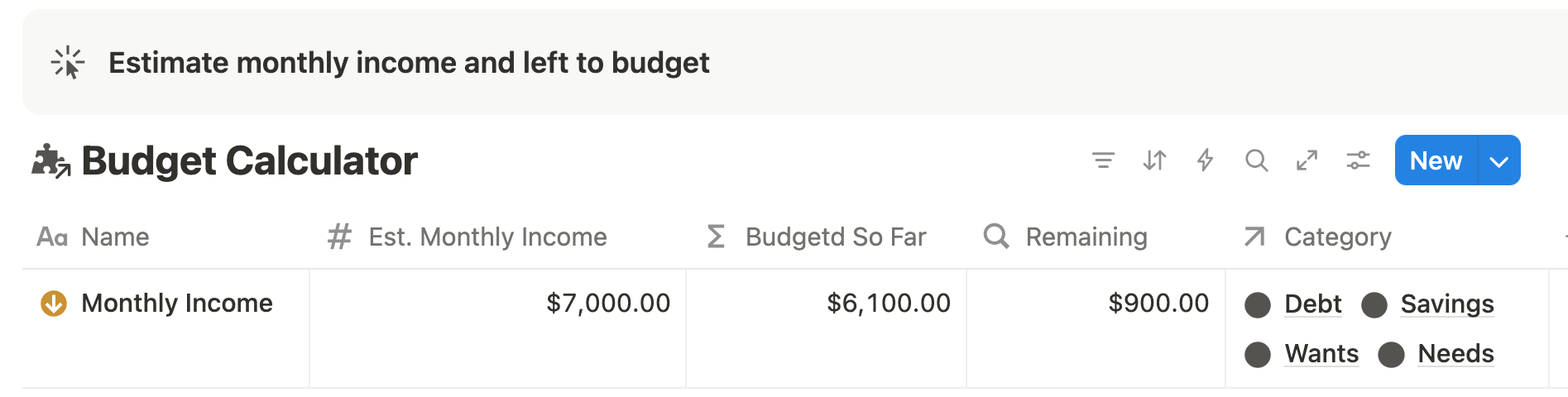
🤑 Income Allocation System
Your income is automatically split using the 50/30/20 rule. You only input your income once, and the system calculates your category budgets instantly.
This ensures your budget is always based on real numbers, not estimates.
🏡 Category-Based Budgeting System
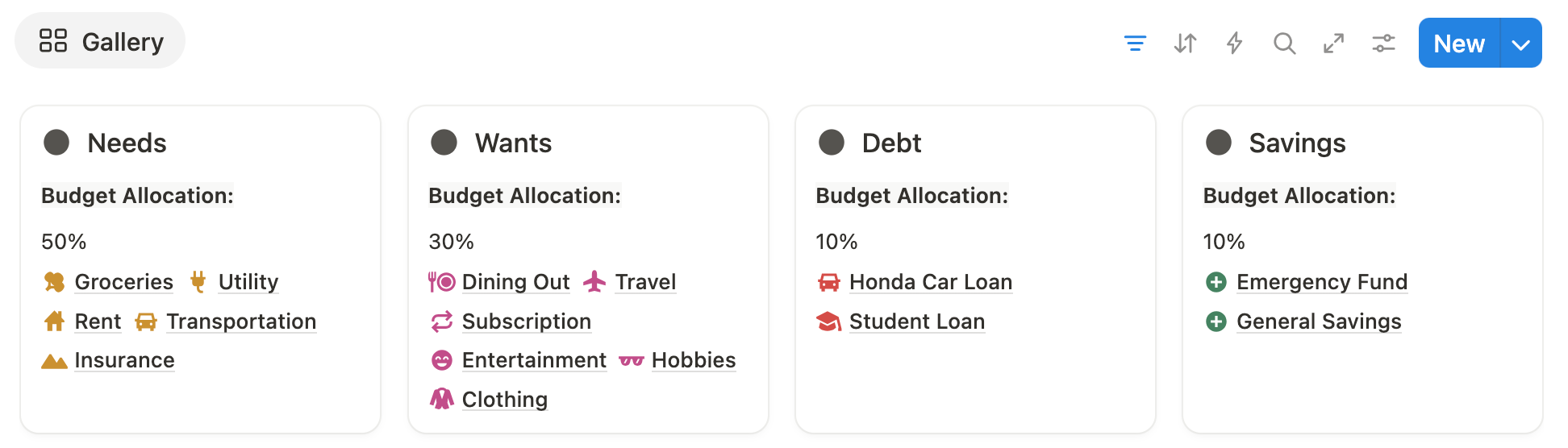
Your budget is organized into clear categories:
- Needs
- Wants
- Savings
- Debt
Each category is broken down into subcategories like groceries, rent, transport, subscriptions, dining, and entertainment.
This helps you plan your spending in detail instead of using a single lump-sum budget.
🛍️ Expense Tracking with Spending Limits
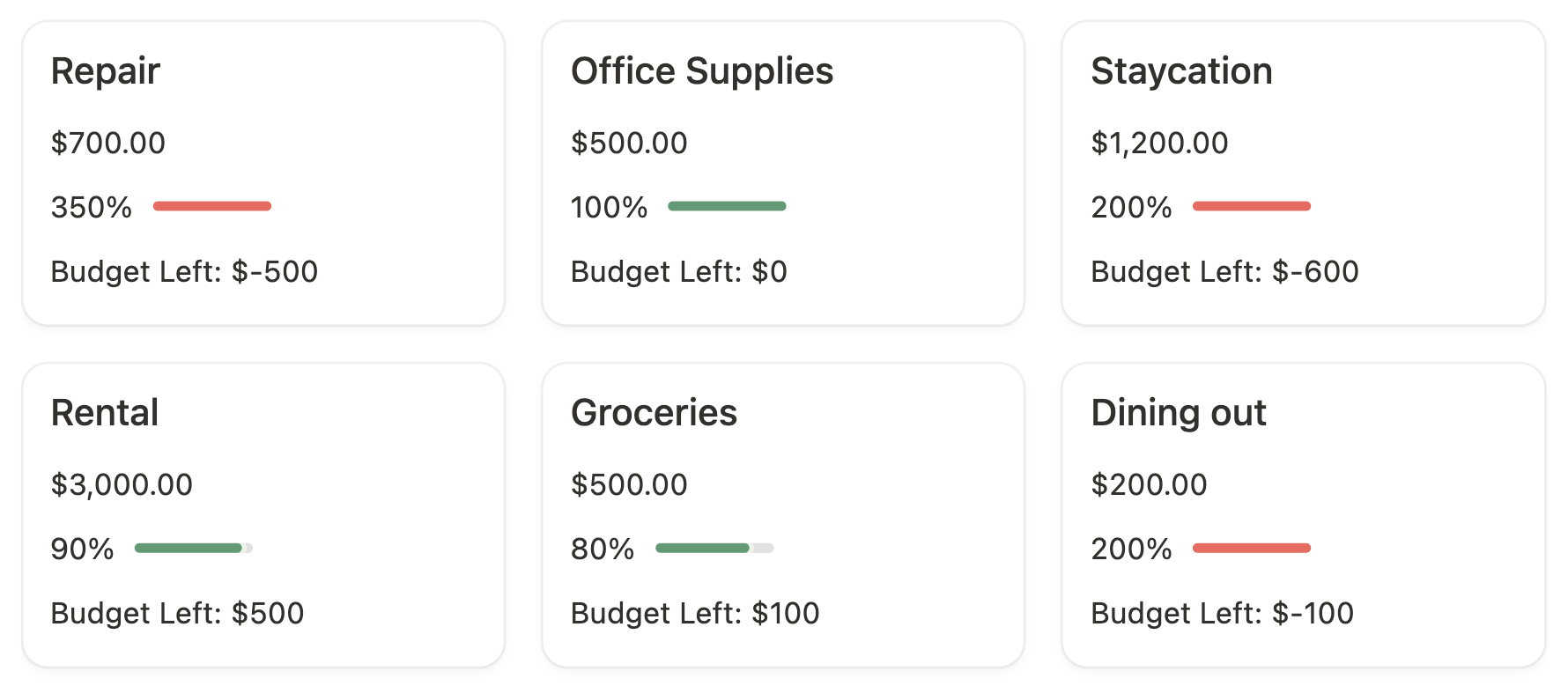
Every expense you log is connected to a category.
You can see:
- how much you have spent
- how much budget is left
- whether you are within or over your limit
This gives you a clear view of your spending behavior in real time.

🟢 Budget Reporting & Insights
The template uses simple visual indicators:
- Green = within budget
- Red = over budget
This makes it easy to understand your budget status at a glance without digging into numbers.
Why This System Is Better Than Monthly Budget Templates
Most budgeting templates require you to rebuild your budget every month. You create new categories, reset values, and start over repeatedly.
The Notion 50/30/20 Budget Template avoids this problem.
You set your structure once using the 50/30/20 rule, and reuse it every month. You only update your income and expenses while the framework stays the same.
This reduces monthly setup effort and removes the need for constant rebuilding.
Instead of focusing on resetting your budget, you focus on making better spending decisions within a stable system.
Who This Notion 50/30/20 Budget Template Is For
This Notion budget template is designed for people who want a simple and structured way to manage their money.
It is a good fit if you:
- often overspend and want clearer spending limits
- are new to budgeting and want a simple system
- prefer Notion over spreadsheets for financial tracking
- want a structured 50/30/20 budgeting system
- need clear category limits before spending money
It works best for users who want structure and clarity, not complex financial tools.
Get the Complete Notion 50/30/20 Budget Template
Get the Notion 50/30/20 Budget Template as part of the Ultimate Notion Finance System and start organizing your monthly budget in a structured way.
Instead of building a budget from scratch, you get a ready-to-use system that helps you plan income, set category limits, and track spending in one place.
👉 Get the template and start setting up your budget inside Notion.

Notion Budgeting Template FAQ
❓ What is the Notion 50/30/20 budget template used for?
It is used to plan your monthly budget using the 50/30/20 rule inside Notion. It helps you split income into clear categories and set spending limits before spending.
❓ How does the 50/30/20 rule work inside Notion?
You enter your income, and the system automatically splits it into 50% Needs, 30% Wants, and 20% Savings or Debt, then converts it into budget limits.
❓ Can I track expenses with this Notion budget template?
Yes. You can log expenses and assign them to categories. The system shows spending progress and remaining budget per category.
❓ Do I need to reset the budget every month?
No. You do not need to rebuild the system every month. You reuse the same structure each month and only update income and expenses.
❓ Is this better than using spreadsheets for budgeting?
This system is easier to maintain than spreadsheets because it removes custom formulas and monthly rebuilding. Everything is structured inside Notion with pre-set categories and limits.
❓ Can beginners use this budgeting system?
Yes. It is designed for beginners who want a simple budget planning structure to follow.
❓ Does this template automatically calculate my budget?
Yes. Once you enter income, it calculates category budgets using the 50/30/20 rule.
❓ Is this part of a larger Notion finance system?
Yes. This template is part of the Ultimate Notion Finance Tracker, which connects budgeting, tracking, and financial organization in one system.