


toc heading
What Is a Notion Life Planner Template?
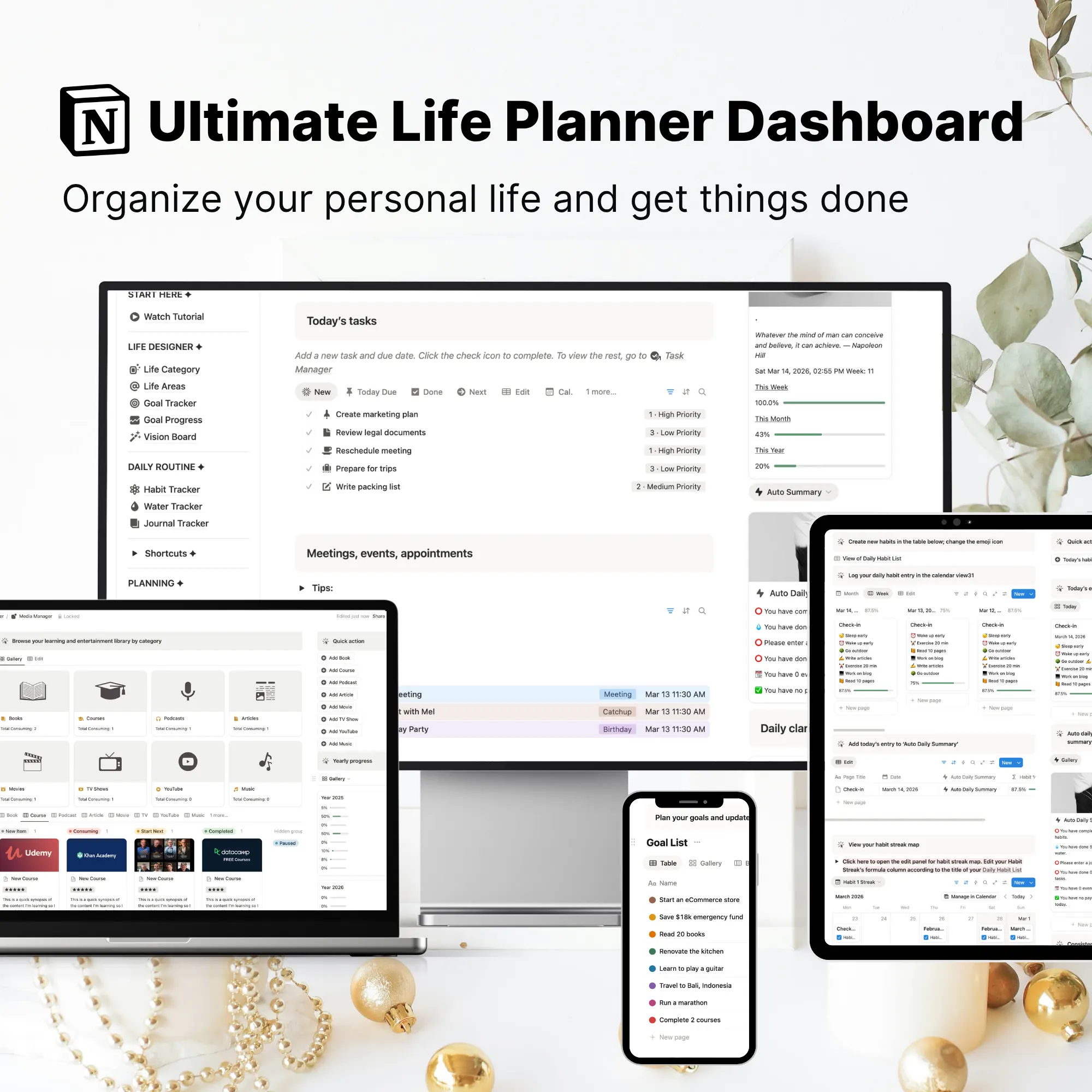
A Notion Life Planner Template is an all-in-one workspace designed to help you organize goals, projects, tasks, notes, habits, and daily planning in one place.
Think of it as an all-in-one life planner that combines planning, organization, tracking, and personal life management inside a single system.
Instead of managing different areas of life across multiple apps, spreadsheets, and notebooks, everything stays organized within one centralized workspace.
Unlike basic planners that focus only on schedules or to-do lists, a Notion life planner:
- Connects different parts of your life so you can move from planning to action with greater clarity.
- Goals can be linked to projects, projects can be broken down into tasks, and daily actions stay connected to the outcomes you're working toward.
In simple terms, this Notion Life Planner Template helps you:
- Organize your life in one place
- Plan your days, weeks, and priorities with clarity
- Manage goals, projects, and tasks together
- Track progress across different areas of life
- Stay focused on what matters most
For people overwhelmed by scattered information, unfinished plans, or disconnected tools, a Notion life planner provides a practical life organization system that keeps everything organized and actionable.
Video Overview: Notion Life Planner Template Walkthrough
If you're looking for a way to organize your life in Notion, this walkthrough demonstrates how the Notion Life Planner Template brings your goals, projects, tasks, notes, habits, and daily planning together in one connected system.
Watch the video below to see how different areas of life stay organized and accessible from a single place, making it easier to plan, prioritize, and follow through on what matters most.
Organize Your Entire Life in One Place
Your goals, tasks, notes, projects, habits, and plans often end up scattered across different apps, documents, and notebooks.
What starts as a simple system gradually becomes harder to maintain. Information gets buried, priorities become unclear, and important things slip through the cracks.
A Notion Life Planner Template helps bring everything together into one connected workspace.
Instead of jumping between multiple tools, you can organize, plan, track, and review different areas of your life from a single place.
Whether you're managing work, personal projects, learning goals, finances, or everyday responsibilities, everything stays accessible and connected when you need it.
For many people, staying organized isn't about finding another productivity hack—it's about having one system they can consistently rely on.
That's exactly what this Notion Life Planner Template is designed to provide.
What Can You Use a Notion Life Planner Template For?
A Notion Life Planner Template can be used to organize and manage multiple areas of life from a single workspace.
Whether you need a personal planner for daily life, a goal planning system, or an all-in-one workspace for life organization, this template is designed to keep everything in one place.
Common use cases include:
🎯 Goal Planning. Set long-term goals and break them into actionable projects, milestones, and daily tasks.
📅 Daily Planning. Organize priorities, plan your day, and stay focused on the actions that matter most.
📁 Project Management. Manage personal and professional projects with linked tasks, deadlines, and progress tracking.
🔁 Habit Tracking. Build routines, monitor consistency, and create habits that support long-term growth.
📖 Learning & Knowledge Management. Keep books, courses, notes, and learning resources organized and easy to revisit.
💰 Personal Life Management. Track finances, responsibilities, important information, and different life areas from one centralized system.
What's Included in This Notion Life Planner Template?
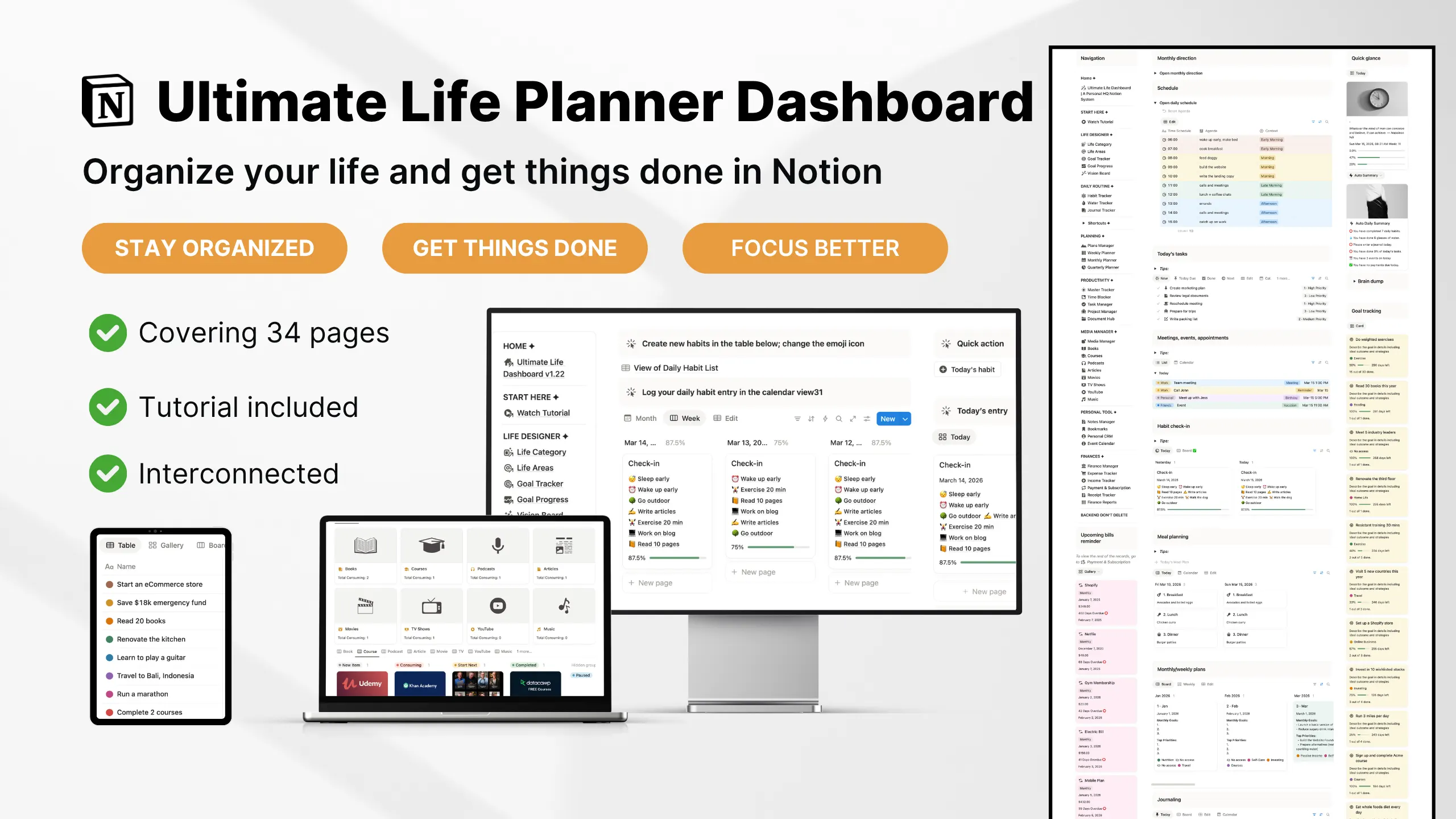
This all-in-one life planner includes dedicated tools for planning, organization, tracking, and personal growth—all connected inside one workspace.
A. Daily Planning & Task Management
This is the operational core of the system, focused on planning and execution.
⏰ Daily Planner
Plan your day with structured scheduling, task breakdowns, and time blocking to reduce overwhelm and improve focus.
✍️ Task Management System
Organize your daily and weekly tasks with priorities, due dates, and status tracking so you always know what needs to be done next.
🏃♂️ Habit Tracker
Build consistency with daily check-ins and progress visibility to maintain long-term routines inside the Notion habit tracker.
B. Goals & Long-Term Planning
Turns long-term direction into actionable steps.
🧭 Life Areas Tracker
Break your life into key areas like health, work, relationships, and personal growth. Helps you see where your attention is going.
🌀 Goals Tracker (OKR-style)
Set clear objectives and track measurable progress across different areas of life with visual progress updates.
📌 Quarterly & Monthly Planner
Plan your life by quarter and break it into clear priorities and tangible outcomes. Focus on direction instead of an overwhelming to-do list so your daily actions stay aligned with bigger goals.
C. Personal Growth & Life Management
Helps you structure long-term balance across life areas.
🌙 Journal & Mood Tracker
Capture daily reflections and track emotional patterns over time. Builds self-awareness through simple, consistent journaling.
📖 Reading / Media Tracker
Track books, courses, podcasts, and learning content with progress status and completion tracking.
💰 Lite Finance Tracking
Monitor income, expenses, and subscriptions in a simple format for financial awareness without complexity.
👥 Contacts / Relationship Tracker
Manage important people, interactions, and relationships in a structured system for intentional connection tracking.
D. Projects & Knowledge Organization
This layer helps you capture, store, and retrieve important information without clutter.
📁 🗂️ Project Tracker
Manage personal or work projects in one place with linked tasks, deadlines, and structured progress tracking.
📝 Notes System (Light Structure)
Capture quick notes and link them to tasks or projects for better context and organization. For workflow example, see this Notion note tracking guide.
📂 Document Tracker
Store important files and references in one searchable system connected to your workflow.
🔖 Bookmarks Tracker
Save and organize useful links and online resources so they are easy to revisit anytime.
How This Life Planning System Works
Many people already know what they want to achieve. The challenge is turning goals into consistent action without relying on memory, motivation, or scattered notes.
That's why this Notion Life Planner Template is built around a simple planning workflow that connects long-term direction with daily execution.
🎯 1. Set Goals and Priorities
Start by defining what matters most across different areas of life, whether that's health, career, finances, relationships, learning, or personal growth.
Having clear priorities creates direction and helps you focus on meaningful progress instead of reacting to whatever feels urgent.
📁 2. Turn Goals Into Projects
Once a goal is defined, break it down into actionable projects.
This makes larger goals feel more manageable while creating a clear bridge between long-term plans and the work required to achieve them.
✅ 3. Execute Daily Tasks
Projects are then broken down into tasks, priorities, and next actions.
Rather than wondering what to do next, you can focus on completing the tasks that move your projects and goals forward.
🔁 4. Review Progress and Stay Consistent
Track habits, review completed work, and monitor progress across goals and projects.
Regular reviews help you stay organized, identify what's working, and make adjustments before small issues become larger problems.
🧠 The Core Planning Workflow
Goal → Project → Task → Review
This workflow is what transforms the Notion Life Planner Template from a simple place to store information into a practical system for organizing your life and following through on your plans.
Why This Notion Life Planner Works
Many planners help you organize information.
Fewer help you connect it.
This Notion Life Planner Template is not a collection of random, disconnected pages. It's a structured life organization system designed to help you move from planning to action with greater clarity.
🔗 Fully Connected System
Goals, projects, tasks, habits, and life areas are linked together, making it easier to see how your daily actions contribute to larger priorities.
⚡ Execution-First Design
Built for daily use and follow-through, not passive planning. The focus is helping you take action consistently rather than simply storing information.
📊 Lightweight Automation
Progress visibility, linked databases, and automated summaries reduce manual tracking while helping you stay aware of what matters most.
🧭 Structured Simplicity
Organized enough to support long-term life planning without becoming complicated to maintain. The layout is designed to stay practical as responsibilities grow.
🧠 Built for Consistency
A planner only works if you continue using it. This system is designed to support daily planning, weekly reviews, and long-term life organization within one workspace.
Who This Notion Life Planner Template Is For
This Notion Life Planner Template is designed for people who want a single system to organize different areas of their life without juggling multiple tools.
It's a good fit if you want to:
- Organize goals, projects, and daily tasks in one place
- Keep notes, resources, and important information easily accessible
- Build consistent planning and review habits
- Manage personal and professional responsibilities from a single workspace
- Reduce the mental clutter caused by scattered systems and disconnected tools
- Stay organized without maintaining multiple apps, spreadsheets, and notebooks
Many users find it especially helpful when life starts becoming more complex and there are simply more things to manage across work, personal goals, learning, finances, and everyday responsibilities.
This Life Planner Is For...
👩💼 Busy Professionals
Manage projects, priorities, goals, and personal responsibilities without everything competing for attention.
🎓 PLifelong Learners
Keep track of learning goals, notes, courses, reading lists, and long-term development in one organized system.
🚀 Creators, Freelancers & Entrepreneurs
Organize ideas, projects, tasks, resources, and business responsibilities while still maintaining visibility across personal life.
🎯 Goal-Oriented Individuals
Turn long-term goals into actionable projects, tasks, habits, and routines that are easier to follow through on consistently.
This Template Is Probably Not For You If...
- You're only looking for a simple to-do list
- You only need a daily planner or calendar
- You prefer managing different areas of life in separate apps
- You're looking for a highly specialized project management system
This template is built for people who want an all-in-one life planner that helps organize goals, projects, tasks, notes, habits, and personal information within a single connected workspace.
Why Use an All-in-One Life Planner Instead of a Basic Planner?
Many free Notion planner templates focus on a single function, such as task management, daily planning, habit tracking, or goal setting.
While these templates can work for specific needs, they often create new problems as your responsibilities grow.
In contrast, an all-in-one life planner brings these pieces together into a connected system.
It's designed to function as a complete life organization system where planning, tracking, and everyday life management work together.
Get Instant Access to the Notion Life Planner Template
Start organizing your goals, projects, tasks, notes, habits, and daily planning in one place with this ready-to-use Notion Life Planner Template.
No setup, configuration, or template building required. Simply duplicate it into your Notion workspace and start organizing your life right away.
Get the Notion Life Planner Template →
Frequently Asked Questions
❓ What is a Notion Life Planner Template?
A Notion Life Planner Template is a structured workspace that helps you organize goals, projects, tasks, notes, habits, and daily planning in one place. Instead of managing different parts of your life across multiple tools, everything stays connected inside a single Notion system.
❓ How do I organize my life in Notion?
One of the simplest ways to organize your life in Notion is by using a dedicated life planner template. A good setup allows you to manage goals, projects, tasks, notes, routines, and important information from one workspace, making it easier to stay organized and maintain visibility across different areas of life.
❓ What should an all-in-one life planner include?
A complete Notion Life Planner typically includes goal tracking, project management, task organization, daily planning, habit tracking, notes, and personal organization tools. The purpose is to connect long-term planning with everyday actions so everything works together within a single system.
❓ What makes this different from a regular Notion planner?
Most Notion planners focus on a specific area, such as daily planning, habit tracking, or task management.
This Notion Life Planner Template is designed as an all-in-one life organization system. Goals, projects, tasks, habits, notes, and planning are connected inside one workspace, making it easier to maintain clarity and see how different areas of life relate to one another.
Rather than managing separate templates, everything works together within a single system.
❓ Can I use this Notion Life Planner for both personal and work life?
Yes. This template is designed to help you manage both personal and professional responsibilities from one workspace.
Many users use it to organize work projects, personal goals, learning plans, habits, finances, and daily tasks without needing separate systems for different areas of life.
❓ Can I customize the Notion Life Planner Template?
Yes. After duplicating the template into your workspace, you can modify pages, databases, properties, and workflows to fit your own planning style.
The structure is designed to be flexible, allowing you to adapt the system as your needs evolve over time.
❓ Is this suitable for long-term life organization?
Yes. This template is designed to support long-term life organization rather than short-term planning alone.
Goals, projects, tasks, habits, notes, and personal information remain connected inside one workspace, making it easier to stay organized and maintain consistency as responsibilities grow over time.
❓ Who is a Notion Life Planner Template best for?
This template is best suited for people who want a single place to organize goals, projects, tasks, notes, habits, and personal responsibilities.
It's particularly helpful for professionals, students, creators, entrepreneurs, and anyone looking for a more organized approach to life planning without relying on multiple disconnected tools.
❓ Can a Notion Life Planner Replace Multiple Templates?
For many people, yes.
Instead of managing separate templates for goals, tasks, habits, projects, notes, and planning, a Notion Life Planner Template brings these functions together inside one organized system.
This makes it easier to maintain your setup, reduce duplication, and keep different areas of life connected over time.