

Are you running a freelancing business?
Tired of endless back-and-forth with clients? Hate dealing with documents all over the place? Introducing the Notion Client Portal Template...
This Notion Template is designed for project-based freelancers, client management, client onboarding and project tracking:
- Manage projects, payments, meetings, and tasks in one place.
- Stay on top of deadlines and track task progress.
- Improve productivity and collaborate better to keep your clients SATISFIED!
- Keep up with your client work without burning out.
✧˖*°࿐ How It Works?✧˖*°࿐
- Step 1: After successful payment, go to your Gumroad purchase portal or check your email to get the link to the template.
- Step 2: Click the "duplicate" button to copy the template. This copy will only be accessible to you and not the public.
- STEP 3: Make your own changes. Add records, change the text, color, layouts.
✧˖*°࿐ Use On Web/Mobile/Desktop ✧˖*°࿐
- Web Version: You can create a free Notion account, duplicate this template via your purchase link and start editing the template.
- Mac & Windows: Go to https://www.notion.so/desktop, download the Notion app to your desktop for a faster experience.
- Mobile: Download Notion app for Android or iOS. Log in to your Notion account and start planning your client tasks on the go.
✧˖*°࿐ Including 10 Functional Templates ✧˖*°࿐
- 01 - Client Proposal Template
- 02 - Payment & Invoice Tracker
- 03 - Task Manager
- 04 - Approval & Review
- 05 - Documents
- 06 - Meetings
- 07 - Brand Kit
- 08 - Deliverables
- 09 - Clip Board
- 10 - Account Manager
✧˖*°࿐ 01 - Client Dashboard ✧˖*°࿐
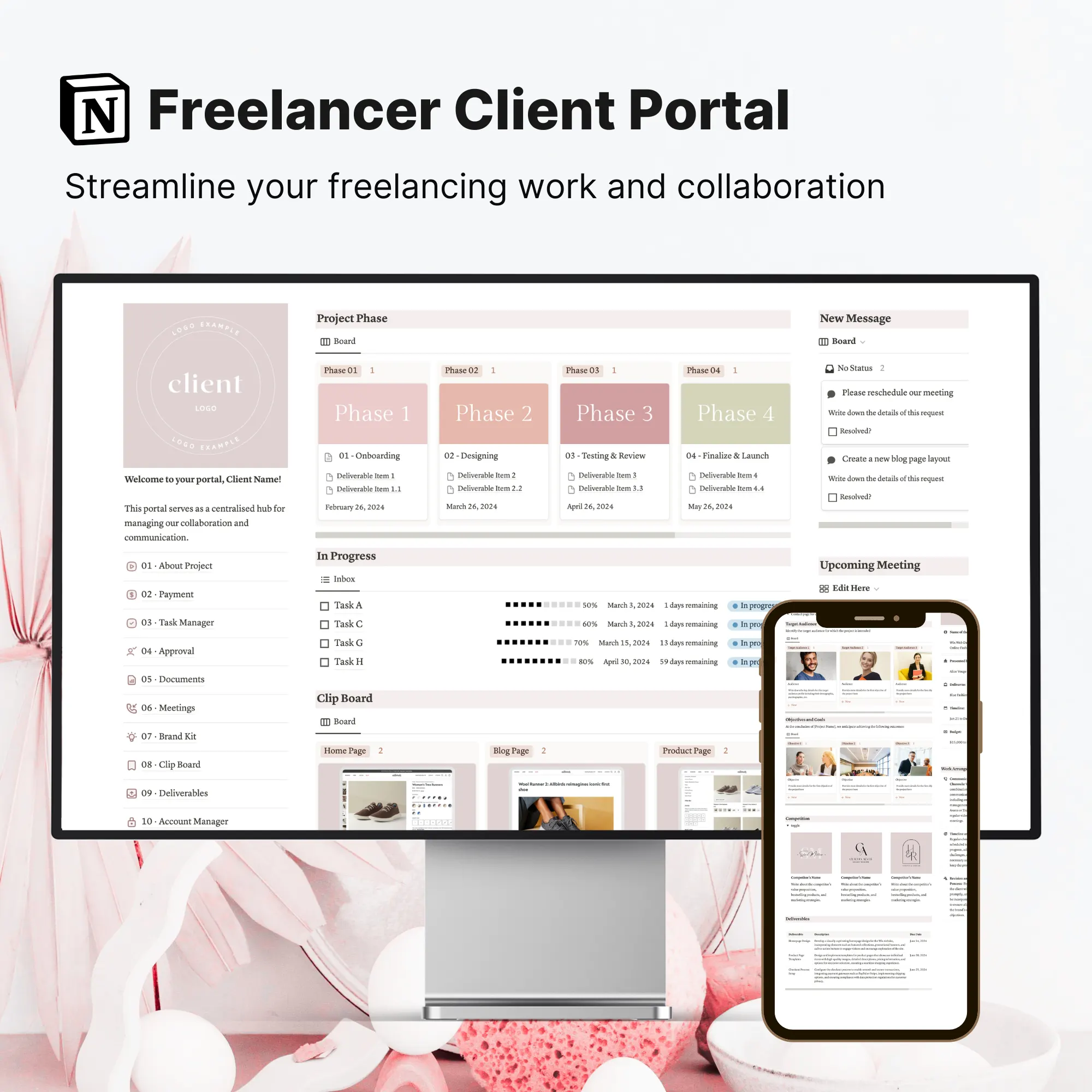
- Improve your client communication and collaboration for maximum productivity.
- A visual overview of task progress, messages replied, and payments made.
- Client can submit a request or send quick messages to the freelancers. You can respond to client messages directly within the portal.
- Visual representation (like progress bars percentage) of tasks related to the client's project.
- Include the name, bio, contact number and email address of the freelancers.
✧˖*°࿐ 02 - Proposal Template ✧˖*°࿐
- Clarify your project’s scope, goals, target audience and competitor’s analysis.
- Offer a detailed audience profile for precise and effective marketing strategies.
- Snapshot: Include the client’s logo, company name, project deadline, and budget.
- Provide a detailed breakdown of the client's goals, outlining the desired outcomes and expected results.
- Analyze the client's competition, upload their logos, and provide detailed information for strategic planning.
✧˖*°࿐ 03 - Payment Hub ✧˖*°࿐
- Track invoice files, and automatically update paid, overdue, and upcoming payments.
- Provide a detailed breakdown of payment terms and specify the payment structure for the project.
- Automatically update “Paid”, “Overdue”, or “Upcoming” based on the invoice issued date.
- Keep track of invoices, upload PDF files, or link them to Google Drive.
- Specify the payment methods such as bank account number or links to PayPal, Stripe, etc.
✧˖*°࿐ 04 - Approval & Review Hub ✧˖*°࿐
- Send your drafts for review, approval, rejection, or client feedback. Collaborate seamlessly.
- Clearly indicate whether drafts require review, approval, or rejection.
- Provide comprehensive feedback in a dedicated document linked to each review item.
- Prompt your client to offer post-project feedback, rating their satisfaction using a Likert scale.
- A designated space for clients to share their testimonials, providing their full name, uploading a photo, and optionally including their company name.
✧˖*°࿐ 05 - Documents Hub ✧˖*°࿐
- Organize client's documents such as company's mission, strategic plans, marketing copies, etc.
- Stores relevant documents and resources related to the client's project.
- Easily categorize documents and resources to make searching easier.
- Pin relevant resources to the right sidebar for easy access.
✧˖*°࿐ 06 - Meetings ✧˖*°࿐
- Schedule meetings with clients, keep track of meeting notes and agendas, and follow up on action items.
- Label each resource with information such as category, source URL, description, keywords, and date added.
- Add a new client meeting and label them as Weekly Sync, Ad Hoc or Brainstorming session.
- Link a call to the relevant meeting notes. Make the meeting notes easily searchable.
✧˖*°࿐ 07 - Brand Kit ✧˖*°࿐
- Keep track of the client's branding strategy, themes, color schemes, and typography.
- Easily reference and apply your brand's color palette for cohesive design elements.
- Give an overview of the client's brand strategy, including brand stories and positioning.
- Manage and showcase your logo designs and variations with organized image uploads.
- Centralize all font-related details including font family, color, sizes, and variations for consistent branding.
- Upload relevant imagery such as website images and illustrations to align with your project's branding.
✧˖*°࿐ 08 - Clip Board ✧˖*°࿐
- Easily exchange new ideas with your clients.
- Collect, organize and share inspiration or design ideas with your clients using the inspiration board.
- Create dedicated folders to organize ideas, designs or inspirations.
- Pin favorited ideas on the right side bar for easy reference.
✧˖*°࿐ 09 - Deliverables ✧˖*°࿐
- A management hub for client's project deliverables.
- Keep track of project's deliverables such as marketing copy, web design, articles, logos, etc.
- Categorize project's deliverables based on project timeline.
- Specify the title, description, due date, and completion date of the deliverables.
✧˖*°࿐ 10 - Account / Password Manager ✧˖*°࿐
- Easily access shared client accounts, track login URLs, and passwords.
- Collaborate with your client's team or internal staff by using account sharing.
- Manage passwords and login details of shared software and digital tools.