


Introduction
Looking for Notion dashboard ideas but not sure what actually works?
That usually means one of three things:
- You’re new to Notion and don’t know how to structure your workspace
- Your current setup feels scattered, with no clear homepage for daily use
- You’ve seen beautiful Notion dashboards online, but you’re not sure which one fits your workflow
Most “Notion dashboard setups” you find online look good—but fall apart the moment you try to use them daily.
They’re either too aesthetic, too complex, or too generic.
A good Notion dashboard should do one thing well: centralize what matters so you can manage your tasks, goals, notes, and priorities in one place.
But the right dashboard depends on what you actually need.
Some people need a simple daily dashboard. Others need a productivity system, life dashboard, finance tracker, second brain, or client workspace.
Whether you're looking for Notion dashboard inspiration, exploring different dashboard setup ideas, or trying to find the best dashboard layout for your workflow, the examples below will help you identify the right starting point.
This guide covers 8 real Notion dashboard ideas and examples you can copy, adapt, or use with templates, based on how people actually plan, organize, and work.
How to Choose the Right Notion Dashboard
Before looking at examples, it's important to understand that there is no single "best" Notion dashboard.
The right dashboard depends on what you're trying to organize.
Some people need a simple homepage for daily planning. Others need a productivity system, finance tracker, second brain, or client workspace.
Instead of copying random setups, start by identifying the problem you're trying to solve.
Notion Dashboard Ideas by Use Case
The best Notion dashboard idea is the one that fits your current workflow—not the most advanced setup.
Most successful dashboards start simple and expand over time.
Common Types of Notion Dashboards
Most Notion dashboards fall into a few common categories.
Some are designed for daily planning, while others focus on productivity, life organization, finances, habits, knowledge management, or client work.
The goal of the examples below is not to show every possible dashboard layout. Instead, they represent the most common dashboard types people use to organize their work and personal life in Notion.
8 Notion Dashboard Ideas You Can Copy or Adapt
Below are 8 Notion dashboard ideas and examples based on different workflows:
- Simple Daily Dashboard
- Productivity Dashboard
- Habit Dashboard
- Goal Tracker Dashboard
- Life Organization Dashboard
- Finance Tracker Dashboard
- Second Brain Dashboard
- Freelancer Dashboard / Client Portal
Each example includes what it’s best for, what it typically includes, and why it works.
1. Simple Notion Dashboard (Best for Daily Minimal Focus)
A Simple Daily Planning Dashboard is the best starting point if you want a Notion setup that actually gets used.
Instead of managing everything, it focuses on what matters today—your tasks, schedules, and priorities.

Key elements 🎯
Keep it lean. Most effective setups include:
- Daily timetable
- To-do list (main execution area)
- Top 3 priorities
- Quick notes / scratchpad
- Calendar view (for time awareness)
Best for 👍
This dashboard works well for:
- Beginners
- Solo operators
- Getting started with a homepage dashboard
- Anyone overwhelmed by complex Notion systems
Why a simple dashboard works for beginners 🔥
Most beginners fail with Notion because they overbuild too early.
This setup avoids that by:
- Keeping your daily workflow visible
- Removing unnecessary structure
- Optimizing for doing, not designing
It strips everything down to what’s actionable today.
2. Productivity Notion Dashboard (Best for Task & Project Systems)
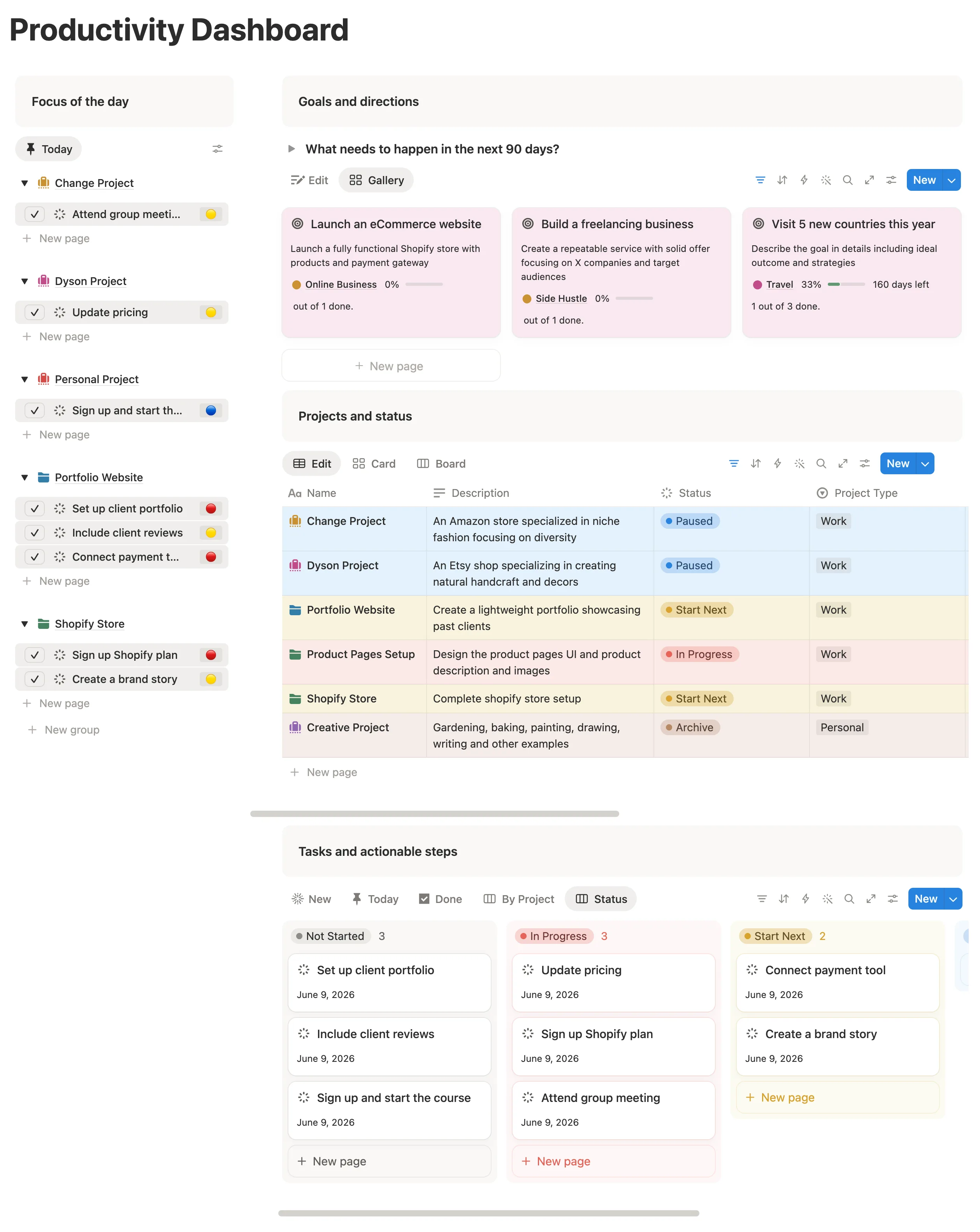
A productivity Notion dashboard is built to turn tasks, projects, and priorities into a clear execution system.
This is one of the most common Notion dashboard examples because most people don’t struggle with ideas. They struggle with moving work forward consistently.
This setup fixes that by giving you a central system for managing tasks, projects, and priorities in one place.
Productivity setup elements 🎯
A strong productivity dashboard usually includes:
- Task database
- Project tracker
- Priority system
- Today / Next task views
- Deadline or timeline view
- Weekly review section
The most important part is the connection between tasks and projects.
A task list alone can become messy. A project system helps each task belong to a bigger outcome.
Best for 👍
This dashboard works well for:
- Freelancers
- Professionals
- Founders
- Creators
- Anyone juggling multiple projects
Why this dashboard works for productivity 🔥
This is one of the most popular Notion dashboard examples for managing projects, priorities, and execution in one workspace.
Instead of asking “What should I work on?” every day, you can open your dashboard and see:
- what is due
- what is important
- what project needs attention
- what should move forward next
This makes it one of the strongest Notion dashboard ideas for productivity.
3. Notion Habit Dashboard (Track Daily Habits with Progress)
A Notion habit dashboard helps you track routines like exercise, reading, sleep, journaling, deep work, or learning.
This setup is useful if your main goal is consistency.

Habit dashboard components 🎯
A habit tracker dashboard usually includes:
- Daily habit checklist
- Weekly or monthly habit view
- Progress bars
- Calendar view
- Streak or completion summary (optional)
- Reflection notes (optional)
Keep this dashboard simple.
If tracking habits becomes too much work, you’ll stop using it.
Why this habit tracker dashboard works 🔥
A habit dashboard works because it creates visible feedback.
You can quickly see whether you’re staying consistent, which habits are slipping, and what patterns show up over time.
This is one of the best Notion dashboard ideas if you want to build routines without using a separate habit tracking app.
Best for habit consistency enthusiasts 👍
This dashboard works well for:
- People building daily routines
- Anyone tracking health, study, or productivity habits
- Users who like visual progress
- People who want accountability inside Notion
4. Life Organization Dashboard (All-in-One Personal System)
A Notion Life Dashboard is a broader personal system for managing tasks, goals, habits, notes, finances, routines, and life areas in one place.
This is one of the most powerful Notion dashboard examples, but also one of the easiest to overbuild.
The goal is not to track everything.
The goal is to create a clear personal workspace that helps you manage the areas of life that matter most.
p/s:
If you're looking for a complete system that combines goals, projects, tasks, habits, notes, finances, and planning into one workspace, see this Notion Life Planner Template.

What to include in a life organization hub 🎯
A powerful life organization dashboard in Notion usually combines multiple layers:
- Life areas overview
- Daily or weekly planner
- Goal tracker
- Habit tracker
- Journal or reflection space
- Notes or idea capture
- Finance overview
- Learning or self-improvement
- Quick navigation hub
This creates a personal life operating system in Notion, not just a digital planner.
Why this dashboard works for life operating system 🔥
A life dashboard works because it brings separate parts of your personal system into one place.
Instead of having habits in one app, goals in another, notes somewhere else, and tasks in a random list, everything connects through one main dashboard.
This is a strong option if you want a complete personal dashboard in Notion.
Best for 👍
This dashboard works well for:
- Personal planning
- Life management
- People managing multiple life areas
- Users who want an all-in-one Notion system
- Anyone building a personal life OS
5. Goal Setting Dashboard (Best for Progress Tracking)
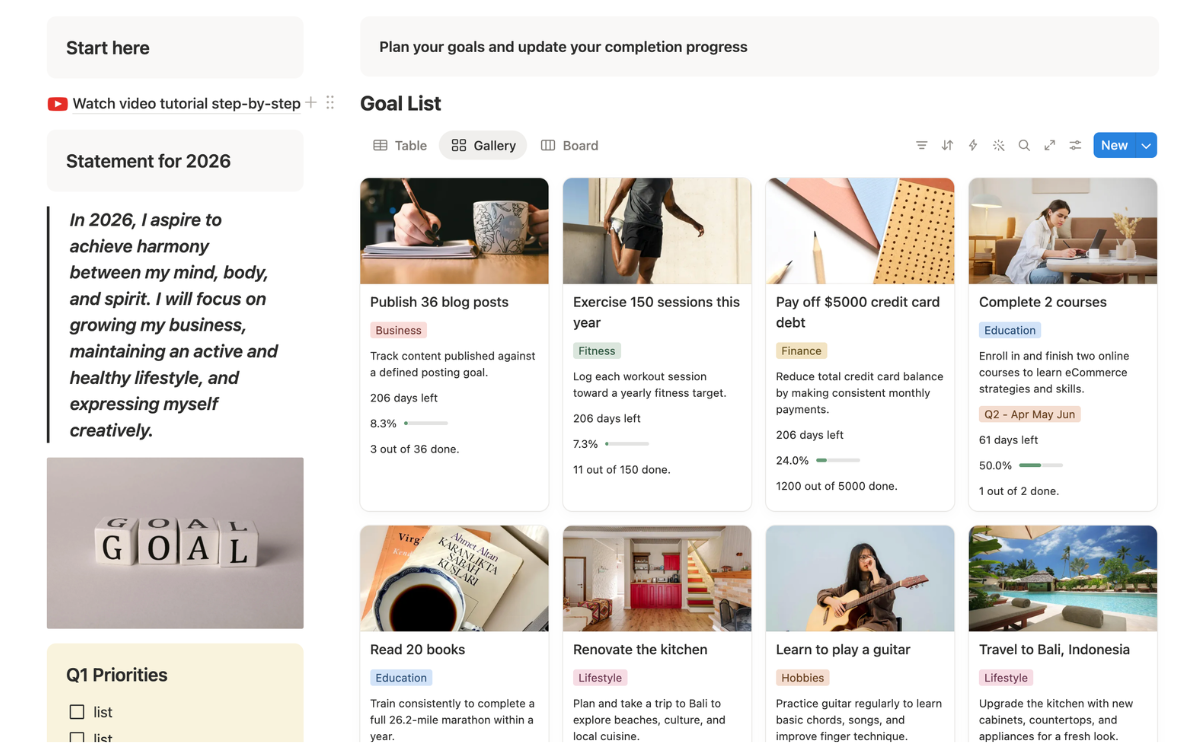
A Notion goal tracker dashboard helps you turn long-term goals into visible progress.
Most people don’t struggle with setting goals. They struggle with reviewing them, measuring progress, and connecting goals to daily action.
A goal dashboard solves that by keeping your bigger outcomes visible.
Things to cover in a goal dashboard 🎯
A goal tracker dashboard usually includes:
- Goal database
- Progress tracker
- Milestone breakdown
- Timeline view
- Linked tasks or projects (optional)
- Review section
The key is making goals actionable.
Why it works for goal setting 🔥
This dashboard works because it bridges the gap between planning and execution.
You can see what you’re working toward, what milestones matter, and whether your daily actions support your bigger goals.
This makes it a useful Notion dashboard example for anyone who wants more clarity and direction.
Best for ambitious people 👍
This dashboard works well for:
- Personal goal planning
- Career goals
- Business goals
- Quarterly or yearly planning
- People who like measurable progress
6. Finance Tracker Dashboard (Organize Expenses, Budgets, and Money)
A Notion finance tracker helps you organize expenses, budgets, savings, subscriptions, income, and debts in one place.
This is one of the most practical Notion dashboard examples because money management often gets scattered across banking apps, spreadsheets, notes, and memory.
A finance dashboard gives you a clear overview of your financial situation.
.webp)
Main components inside a finance tracking dashboard 🎯
A strong personal finance system in Notion usually includes:
- Expense tracker → Log daily or monthly spending in one place
- Budget overview → Set limits for different spending categories
- Savings goals tracker → Monitor progress toward financial goals
- Income tracking → Salary, freelance, side income, etc.
- Cash flow summary → Understand money in vs money out
- Debt tracker → Loans, repayments, outstanding balances
- Subscription tracker → Recurring payments and renewals
- Net worth overview → Track overall financial position over time
Each element works together to give you a clear, structured view of your finances without unnecessary complexity.
Why it works for personal money management 🔥
A finance dashboard works because it makes spending visible.
Whenever you open your dashboard, you can see your expenses, budget limits, savings progress, and recurring payments in one structured homepage.
This is a strong Notion dashboard idea if you want financial clarity without relying only on spreadsheets.
Best for 👍
This Notion dashboard works well for:
- Managing personal finance in Notion
- Budgeting
- Track spending habits
- Review financial health
If you want to avoid building this finance system manually, you can start with a Notion finance template and customize it based on your spending habits.
7. Notion Freelancer Client Portal
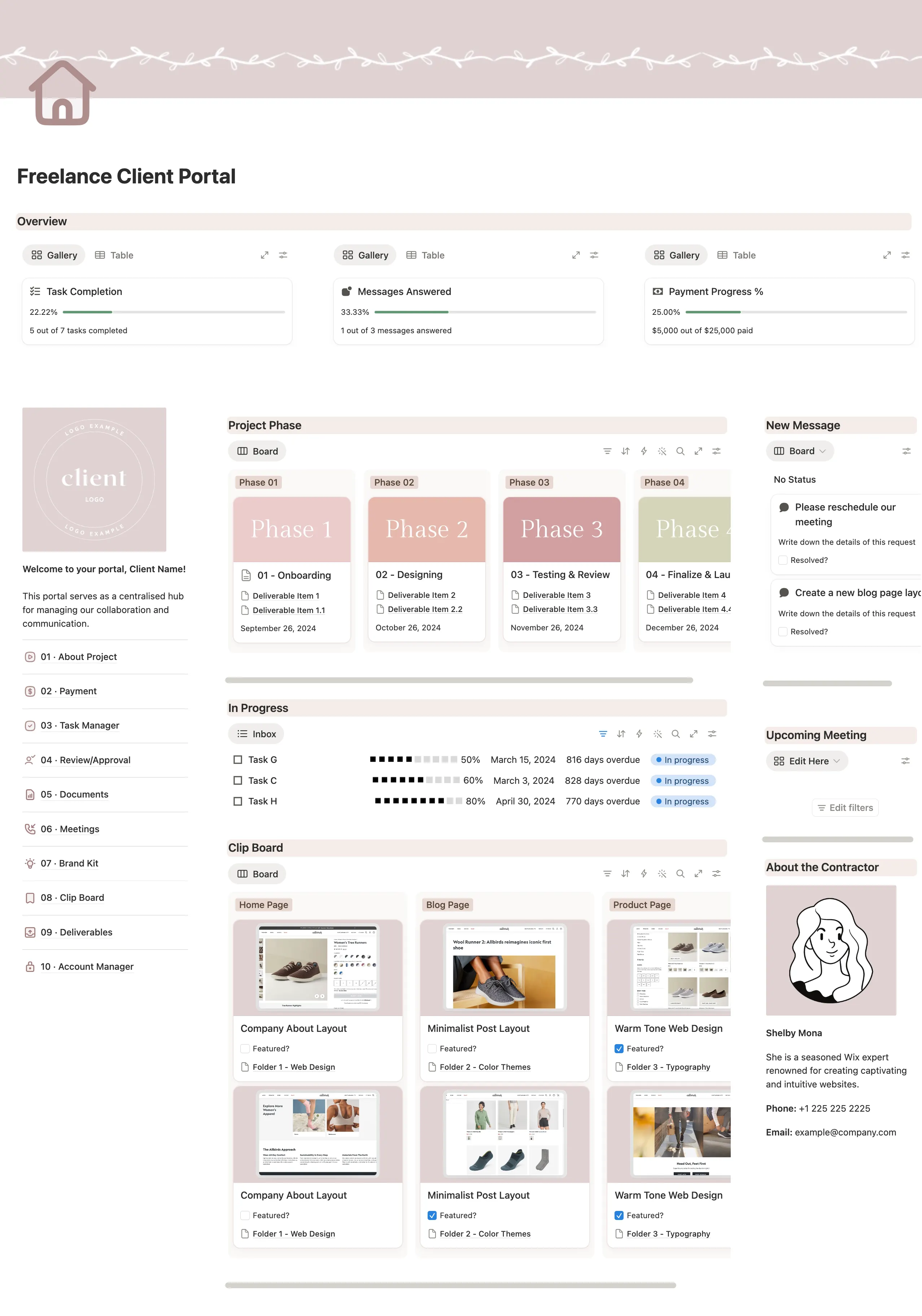
A freelancer dashboard in Notion helps you manage clients, projects, deliverables, deadlines, feedback, and communication in one workspace.
This is useful if your client work is spread across email, messages, documents, invoices, and task lists.
A freelancer dashboard gives you one place to see what’s active, what’s due, and what each client needs.
Main pages and components 🎯
A freelancer client portal in Notion usually includes:
- Client databases
- Project tracker (linked to each client)
- Deliverables board (tasks, milestones, and submissions)
- Communication log (notes from calls, emails, feedback)
- Invoice or payment tracking section (lightweight overview)
- Status dashboard (what’s in progress, pending, or completed)
This creates a lightweight client portal system inside Notion, without needing complex software.
Why this is one of the most useful Notion dashboard examples 🔥
This system works because it replaces fragmented client management with a single structured workspace.
It reduces miscommunication, keeps deliverables visible, and makes it easier to track progress across multiple clients without losing detail.
By keeping everything inside a simple Notion dashboard for client work, freelancers can focus more on delivery and less on coordination overhead.
Best for service-based work 👍
This dashboard works well for:
- Freelancers
- Consultants
- Agencies
- Service providers
- Solo business owners managing clients
8. Second Brain Dashboard (Capture Notes, Ideas, and Knowledge)
A second brain dashboard in Notion helps you capture, organize, and retrieve notes, ideas, resources, and knowledge.
This setup is useful if you collect a lot of information but struggle to find or use it later.
Instead of letting notes sit in random pages, a second brain dashboard gives your knowledge a clear structure.
Key elements to cover 🎯
A well-designed Second Brain dashboard in Notion usually includes:
- Notes database (quick capture of ideas and thoughts)
- Tags or categories (to group knowledge by topic or context)
- Reference library (articles, resources, saved content)
- Project-linked notes (connecting ideas to active work)
- Inbox capture area (for fast idea dumping)
- Search or filtered views (to retrieve knowledge easily)
This creates a knowledge management dashboard in Notion, not just a note archive.
Why it works for knowledge management 🔥
By building a structured knowledge system that supports thinking, writing, learning, and creating, you can reduce information loss.
This is one of the best Notion dashboard ideas if your main problem is managing information, not tasks.
Best for knowledge creators 👍
This dashboard works well for:
- Creators
- Writers
- Students
- Researchers
- Knowledge workers
- People saving articles, ideas, notes, and references
Found the Right Dashboard for Your Workflow?
The goal of these Notion dashboard examples isn't to use all eight systems at once.
It's to identify the dashboard that solves your biggest organizational challenge right now.
Whether you need a simple daily dashboard, a productivity workspace, a personal dashboard, a finance tracker, or a second brain, starting from a proven template is usually faster than building everything from scratch.
You can customize the system later, but the structure is already built and ready to use.
👉 Explore ready-to-use Notion dashboard templates here:
Ultimate Notion Personal Finance System
Frequently Asked Questions
What is a Notion dashboard?
A Notion dashboard is a centralized homepage that brings together important information such as tasks, projects, goals, notes, calendars, and trackers in one place. Instead of navigating through multiple pages, a dashboard gives you a single starting point whenever you open Notion.
What should a Notion dashboard include?
A useful Notion dashboard should include the information you access most often. Common elements include a task list, calendar, notes section, quick links, goals, habits, or project views. The exact structure depends on what you're trying to manage and how you use Notion daily.
How do I organize my Notion dashboard?
Start by placing your most important information at the top of the page. Daily tasks, priorities, and frequently used pages should be the easiest to access. From there, organize supporting areas such as projects, notes, goals, or trackers into clearly separated sections.
What is the best Notion dashboard for beginners?
For most beginners, a simple daily dashboard is the best place to start. A lightweight setup focused on tasks, priorities, notes, and a calendar is easier to maintain and more likely to become part of your daily routine than a complex all-in-one system.
Should I use one dashboard or multiple dashboards in Notion?
Most people benefit from having one primary dashboard that acts as their homepage. Additional dashboards can be used for specific areas such as finances, habits, projects, or knowledge management, but they should support your main workspace rather than replace it.
How often should I update my Notion dashboard?
A dashboard should be updated only as often as your workflow requires. Daily dashboards may be reviewed every morning, while goal, finance, or project dashboards might only need weekly updates. The best dashboard is one that stays useful without requiring constant maintenance.
Can a Notion dashboard replace multiple productivity apps?
In many cases, yes. A well-designed Notion dashboard can combine task management, goal tracking, note-taking, habit tracking, project planning, and personal organization into one workspace. However, some users still prefer dedicated apps for specialized functions such as calendars or budgeting.
Are Notion dashboard templates worth using?
Templates can save significant setup time because the structure is already built. They're especially useful if you're new to Notion or want to start with a proven system. Most templates can also be customized later as your workflow evolves.